
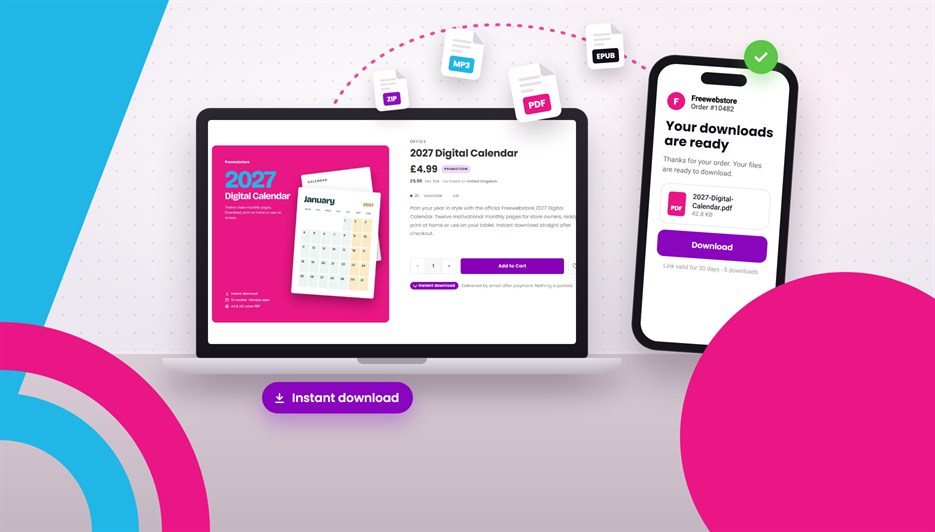
You can now sell digital products on Freewebstore. Ebooks, music, sewing patterns, printables, fonts, video, 3D files: upload the file to a product, and every customer who pays gets a secure download link by email, automatically.
Digital downloads are live today on every paid plan: Startup, Pro and Ridge.
Why this matters
Until now, selling a file on Freewebstore meant hosting it somewhere else, then emailing each buyer a link yourself. It worked, but it was one more job on every order, and it fell apart the moment you were asleep, on holiday or busy packing parcels.
Now the file lives on the product. The customer pays, the link goes out, and you don’t have to do anything. Make something once, and sell it as many times as you like.
How to set it up
- In your control panel, open the product you want to sell as a download (or create a new one).
- Go to the Advanced tab and tick Digital Download.
- Drop in your file, or several files if the product comes in more than one format.
- Save. That’s it.
Once a product is digital, its weight and shipping fall away, because there’s nothing to post. A storage meter on the panel shows how much of your plan’s space you’ve used.

What you can sell
Allowed formats include PDF, EPUB, ZIP, MP3, WAV, MP4, images, fonts and 3D files. Programs and scripts are refused, and every upload is scanned for malware before it can be sold. A few ideas:
- Ebooks and guides: novels, cookbooks, workbooks, how-tos. Sell the paperback and the ebook side by side.
- Music and audio: tracks, albums, sample packs, audiobooks.
- Patterns and printables: sewing and knitting patterns, planners, wall art, colouring pages.
- Photos, art and fonts: high-resolution images, digital artwork, typefaces, design assets.
- Video: tutorials, workouts, recorded classes.
- 3D files: models and 3D printing files.
Storage on each plan
| Plan | Total file storage | Largest single file |
|---|---|---|
| Startup | 2 GB | 250 MB |
| Pro | 10 GB | 1 GB |
| Ridge | 100 GB | 4 GB |
Digital downloads aren’t available on the free Community plan. If you’re on Community and want to start selling files, upgrading to Startup is all it takes.
What your customer sees
Digital products sit in the basket like anything else, and they can be mixed with physical products in the same order. Shipping is only charged on the things you post. Customers buy one copy of each digital product per order. If your store uses an EPIC design, digital products show an Instant download badge, so shoppers know what they’re getting.

As soon as the order is paid, your customer receives a “Your downloads are ready” email with a secure link for each file. Card payments deliver straight away. If the customer pays offline (by bank transfer, for example), the links go out when you click Mark as Paid on the order.
By default, each link is valid for 30 days and allows 5 downloads per file. You can change both, and the wording of the email, under Orders > Digital Downloads.
“My link doesn’t work”: a thirty-second fix
Every order with a digital product has a Digital Delivery card on the order page. It shows each link’s status, how many downloads have been used, the full download history and the exact link your customer was sent. From the card you can:
- Copy link: paste the customer’s link straight into a reply.
- Test download: open the file yourself without using up any of the customer’s downloads.
- Send download links: re-send the email if it went astray.
- Reset limits: give the customer a fresh download count and expiry date.
- Revoke: switch the links off.
Refunds and cancellations revoke the links automatically, so there’s nothing to remember there.
Good to know
- Google Shopping: digital products are left out of your Google Shopping feed by default. Google’s Shopping ads policy doesn’t accept ebooks, and a download has no shipping details. Your digital products still appear in your store and in normal search results.
- One-off purchases: each digital product is a single purchase. Freewebstore doesn’t offer subscriptions or recurring billing.
- If you move back to Community: your files are kept and links you’ve already sent keep working until they expire. You won’t be able to sell or upload new digital products until you’re back on a paid plan.
Start selling your first download
If you’re on Startup, Pro or Ridge, it’s already switched on. Open a product, tick Digital Download on the Advanced tab and upload your file. For the full rundown, see the digital downloads page.
On Community? Have a look at the plans. Startup includes 2 GB of file storage, along with discount codes, gift cards and your own domain free for the first year.
Leave a Reply